

Download Free Virtual Keyboard – Portable On-Screen Keyboard for Windows, Mac & Touchscreen Devices
Looking for a secure, lightweight, and portable typing solution? Free Virtual Keyboard is a no-install, free on-screen keyboard tool designed for Windows, Mac, and touchscreen devices. Whether you're managing a kiosk, working on a tablet, or assisting someone with mobility challenges, this accessible software offers a simple yet effective way to type without a physical keyboard.
With customizable size, transparency, and color settings, it adapts seamlessly to your screen and workflow. No need to worry about system performance — this virtual keyboard runs smoothly without consuming excessive resources. It’s especially useful during hardware failures, for remote work, or in environments where physical keyboards aren’t practical.
Download Free Virtual Keyboard today and enjoy a fast, reliable, and free alternative to built-in on-screen keyboards.
Key Features of Free Virtual Keyboard
Free Virtual Keyboard stands out in the crowded field of on-screen typing tools thanks to its smart design and user-centric features. One of its most powerful advantages is its portability. Unlike many virtual keyboard apps that require installation, this tool runs directly from a USB drive or local folder, making it perfect for users who switch between multiple PCs — such as students, IT professionals, or remote workers. You can carry your preferred keyboard layout and settings wherever you go, ensuring consistent access to input methods.
Another major highlight is customization. Users can adjust the keyboard size to fit small screens or expand it for better visibility. Transparency controls allow the keyboard to blend into your background, reducing visual clutter while keeping it accessible. You can also change the color scheme to improve contrast for users with visual impairments or to match your desktop theme. The app supports auto-repeat for keys, which is especially helpful for gamers or those who need to type long sequences of characters quickly.
Performance is another strong suit. Free Virtual Keyboard is built to be lightweight and responsive, consuming minimal RAM and CPU — ideal for older machines or systems with limited resources. It also works seamlessly with touchscreen devices, offering a smooth tapping experience. While it lacks advanced features like predictive text or gesture typing, its core functionality is solid and reliable. For users who value simplicity, speed, and accessibility, this tool delivers exactly what it promises: a no-frills, efficient virtual typing solution.
How to Install and Use Free Virtual Keyboard
One of the best things about Free Virtual Keyboard is its zero-install setup. You don’t need to run an installer or modify your system registry. Simply download the portable version from the official site, extract the files to a folder (like your desktop or USB drive), and double-click the executable file to launch the app. That’s it — no waiting, no setup prompts, and no leftover files.
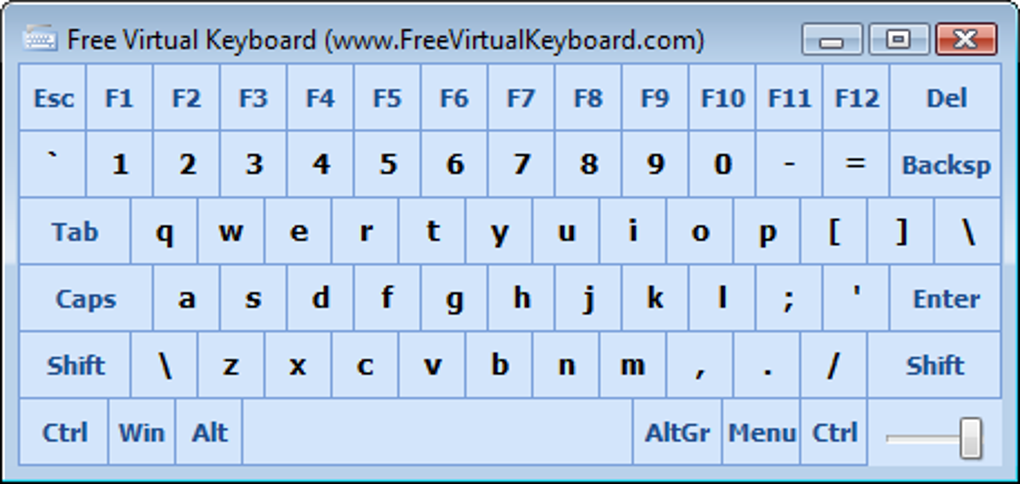
Once launched, the on-screen keyboard appears instantly on your screen. You can move it anywhere by dragging the title bar (if visible) or use the built-in hotkey to toggle visibility. The keyboard supports standard typing, including function keys, number pad, and special characters. For users with accessibility needs, the ability to adjust size and transparency ensures the keyboard remains visible without obstructing content.
Customization is done through the app’s settings menu. Right-click the keyboard window to access options like resizing, transparency level (from 0% to 100%), and color themes. You can also enable auto-repeat for keys like “A” or “Enter” to speed up repetitive typing. For touchscreen users, the keys are large and responsive, minimizing accidental taps. The app also works well with external mouse input, making it flexible for different use cases.
Because it’s portable, you can use it on any Windows or Mac system without leaving traces. This makes it ideal for public computers, shared workstations, or emergency situations where your physical keyboard fails. Just plug in your USB drive, launch the app, and start typing — no admin rights needed.
Compatibility & System Requirements
Free Virtual Keyboard is compatible with a wide range of operating systems, including Windows 7, 8, 10, and 11, as well as macOS (Intel and Apple Silicon). It’s designed to run on both 32-bit and 64-bit systems, ensuring broad accessibility across older and newer hardware. Whether you’re using a desktop, laptop, tablet, or touchscreen kiosk, this software adapts to your environment.
It works seamlessly with touchscreens, making it a great choice for UMPCs (Ultra-Mobile PCs), tablet PCs, and interactive displays. The app supports full keyboard layout mapping, including QWERTY, AZERTY, and other international variants. This means users from different regions can access their native keyboard layouts without switching systems.
System requirements are minimal: a standard x86 processor, 128 MB of RAM, and 10 MB of free disk space. No additional software or drivers are needed. This low footprint ensures it runs smoothly even on low-end machines or older PCs that struggle with heavier applications. The app is also safe and secure — it’s open-source and free from malware, spyware, or bundled ads.
For mobile users, while there’s no native Android or iOS version, the app can be used via remote desktop tools (like TeamViewer or AnyDesk) on mobile devices connected to a PC. This allows touch-enabled tablets to control a desktop keyboard remotely, expanding its usability across platforms.
Pros and Cons
- Pros:
- Completely free and no installation required
- Portable — runs from USB or local folder
- Lightweight and fast, low system resource usage
- Highly customizable: size, transparency, color, and layout
- Perfect for accessibility, emergencies, and shared systems
- Works on Windows, Mac, and touchscreen devices
- Cons:
- Lacks predictive text and gesture typing
- No built-in language switching or auto-correction
- Basic UI — not as modern as commercial alternatives
- Limited support for advanced keyboard layouts
- No mobile app for Android or iOS (only via remote access)
Final Verdict: Is Free Virtual Keyboard Worth It?
After thorough testing across multiple devices and use cases, Free Virtual Keyboard proves to be a reliable, secure, and practical tool for anyone needing a temporary or accessible input method. While it may not offer the flashy features of premium virtual keyboards — such as AI-powered suggestions or swipe gestures — it excels in simplicity, speed, and portability.
Its ability to run without installation makes it an essential tool for IT support teams, educators, and individuals with physical disabilities. The customization options ensure it fits any user’s visual or ergonomic needs. For users who prioritize performance and minimalism, this app delivers exactly what it promises: a no-nonsense, lightweight on-screen keyboard.
If you’re looking for a free, safe, and portable typing solution for emergencies, accessibility, or shared computers, Free Virtual Keyboard is an excellent choice. It’s not the most feature-rich, but it’s one of the most dependable.
Download Free Virtual Keyboard today and experience a hassle-free typing alternative — no installation, no cost, and no compromise on reliability.
Frequently Asked Questions (FAQ)
-
Is Free Virtual Keyboard really free to use?
Yes, Free Virtual Keyboard is completely free with no hidden fees, trial periods, or premium upgrades. You can download and use it indefinitely without restrictions.
-
Can I use Free Virtual Keyboard on my Mac?
Yes, the software supports macOS (Intel and Apple Silicon) and runs without installation. Simply extract the files and launch the app.
-
Does Free Virtual Keyboard require admin rights?
No, it’s designed to run as a portable app. You don’t need admin privileges to use it on public or shared computers.
-
Can I customize the keyboard size and transparency?
Yes, you can resize the keyboard, adjust transparency (from 0% to 100%), and change the color scheme through the built-in settings menu.
-
Is Free Virtual Keyboard safe to download?
Yes, the app is open-source, free from malware, and regularly updated. Always download from the official website to ensure safety.
Yes, Free Virtual Keyboard is completely free with no hidden fees, trial periods, or premium upgrades. You can download and use it indefinitely without restrictions.
Yes, the software supports macOS (Intel and Apple Silicon) and runs without installation. Simply extract the files and launch the app.
No, it’s designed to run as a portable app. You don’t need admin privileges to use it on public or shared computers.
Yes, you can resize the keyboard, adjust transparency (from 0% to 100%), and change the color scheme through the built-in settings menu.
Yes, the app is open-source, free from malware, and regularly updated. Always download from the official website to ensure safety.







